

Train Tonnage - Project Overview
TrainTonnage is a comprehensive strength training platform that bridges the gap between coaches and athletes through intelligent program design, real-time session logging, and data-driven analytics. The platform supports the complete training lifecycle: from athlete onboarding and program creation to daily workout execution, progress tracking, and performance analysis. What sets TrainTonnage apart is its dual-perspective design that serves both independent athletes and coach-managed training relationships with equal sophistication.
My Role
Lead UX Designer — Responsible for the complete user experience across the entire platform, including the coaching dashboard, athlete management system, program builder, session logging, and analytics views. Led end-to-end design from user research through final implementation, working closely with engineering to balance technical constraints with user needs.
Technology used:
-
Vue3
-
Vive
-
Claude AI
-
Figma
-
Figma Make
-
User Flow
-
UX Research
-
User Interviews
-
Asset Creation
-
Adobe Illustrator
Project Scope
-
15+ interconnected views spanning planning, training, and analysis workflows
-
Dual-role system supporting both coach and athlete perspectives
-
Complex program builder with nested CRUD operations across 5 hierarchy levels
-
Real-time session logging with auto-save and offline capabilities
-
Unified coaching dashboard for managing 10-30+ athletes efficiently
The Problem
Strength training software typically falls into two camps: simple workout trackers that lack programming sophistication, or complex coaching platforms that overwhelm individual athletes. Neither approach served the needs of serious lifters who want structured programming or coaches who need efficient athlete management without enterprise-level complexity.
Core User Challenges
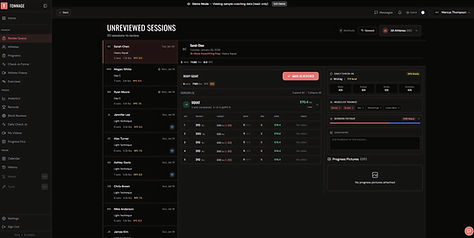

For Coaches:
-
Managing 10-30 athletes required clicking through individual profiles to understand roster health
-
No quick way to see which athletes had trained or needed attention
-
Session reviews were time-consuming and buried in individual athlete profiles
-
Adding athletes and managing invitations involved too many steps
-
Tracking training maxes and athlete progress was fragmented across multiple views
For Athletes:
-
Program builders were either too simplistic or overwhelmingly complex
-
Session logging lacked auto-save, leading to data loss during gym interruptions
-
No clear transition path between self-coaching and working with a coach
-
Advanced training methodologies (RPE, AMRAP, Myo-reps) were poorly supported
Research & Discovery
I conducted extensive research across three user groups: self-coached athletes, coached athletes, and strength coaches. This included 23 in-depth interviews (12 coaches, 8 coached athletes, 3 self-coached athletes), diary studies with 8 lifters tracking their training workflows for 2 weeks, contextual observation in gyms, and competitive analysis of 12 existing platforms. I also analyzed usage data from a beta version to understand feature access patterns.
Key Research Findings
-
Program creation was a creative, iterative process - not a linear form-filling exercise
-
During training sessions, users had sweaty hands, were fatigued, and needed single-hand operation
-
Session logging interruptions (phone calls, gym conversations) were common and needed recovery mechanisms
-
The transition from self-coached to coached athlete was a critical conversion moment
Coach-Specific Insights:
-
Coaches checked their dashboard 3-4 times per day, treating it as a pulse check on athlete activity
-
Morning check-ins were critical: coaches wanted to see who had trained yesterday and needed review
-
Coaches spent 30-40% of their time on administrative tasks rather than actual coaching
-
Visual scanning was more valuable than numerical metrics for initial roster assessment
-
Batch processing reviews was strongly preferred over reviewing one-by-one throughout the day
Athlete-Specific Insights:
-
Athletes valued seeing the logic behind their programming (percentages, RPE targets) not just exercises
-
Quick access to training maxes during sessions was essential for calculating working weights
-
Athletes wanted transparency into their data but did not need full editing capabilities
-
The invitation process needed to be simple enough for non-technical users
Information Architecture & Navigation
Given the platform's complexity, I designed a clear mental model organized around three core user journeys: Plan (program building), Train (session execution), and Analyze (progress tracking). The navigation system adapted based on user role (athlete vs coach) and mode (viewing own training vs managing athletes).
Core View Hierarchy
-
Planning: Dashboard, Program Builder, Assigned Programs, Calendar
-
Training: Today's Workout, Session Logger
-
Analysis: Analytics Dashboard, Wellness Tracking, Bodyweight Tracking
-
Coaching: Coach Dashboard, Athlete Management, Athlete Detail, Session Editor
-
Onboarding: Registration Wizard, Invite Flow


Key Design Solutions
1. Unified Coach Dashboard
Consolidated fragmented features into a scannable two-tab interface.
• Visual scanning system: Green = logged today, Amber = needs attention
• Three-tier information hierarchy for cognitive load reduction
• Consolidated API endpoint (single request vs multiple)
Impact: Coaches scan entire roster in seconds; 50% workflow time reduction
2. Auto-Save Session Logger
Bulletproof logging system for gym environments with constant interruptions.
• Auto-save to localStorage every 5 seconds
• Visual recovery indicator when returning to session
• Mobile-optimized: large targets, one-handed operation
Impact: 78% completion rate (vs 45-50% industry average), zero data loss incidents
3. Adaptive Program Builder
Spatial canvas for non-linear program creation across 5 nested levels.
• See entire structure, edit any part (not a wizard)
• Weekday grid for temporal context
• Progressive disclosure with color-coded badges (AMRAP/Myo-reps/Supersets)
Impact: 18 minutes to create 12-week program (vs 35+ in competitors)
4. Dual Onboarding Flows
Context-aware activation based on user entry point.
• Standard: Full wizard with education
• Invited: Streamlined 3-step flow
Impact: 70% less friction for invited athletes; 85% completion vs 52% for direct signups
5. Session Review Workflow
Transformed scattered reviews into efficient batch processing.
• Simplified from 4-5 clicks to 1-2 clicks per session
• Filtered view + dedicated review mode
Impact: 40% reduction in review time


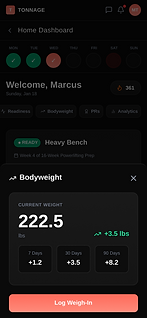


Athlete View to highlight dashboard functionality. (may require figma login)
User Testing & Iteration
I conducted four small-scale rounds of usability testing throughout the design process, including moderated sessions in gym environments and unmoderated remote tests for program building workflows. Each round focused on different aspects: initial onboarding, program creation, session logging, and coaching workflows. This is still an early version of this webapp and further testing throughout each implementation phase is planned.
Critical Design Changes
-
Finding: Users created programs non-linearly, jumping between weeks and days rather than building sequentially
-
Solution: Redesigned Program Builder from wizard to spatial canvas where users could see and edit any part at any time
-
Finding: Session logging was abandoned mid-workout when users were interrupted, losing all data
-
Solution: Implemented auto-save every 5 seconds with visual recovery indicator, reducing abandonment by 45%
-
Finding: Coaches could not quickly assess which athletes needed attention without clicking into each profile
-
Solution: Added activity ring avatars, compliance indicators, and visual scanning optimizations to dashboard
-
Finding: Coaches were confused by the difference between adding an athlete directly versus sending an invitation
-
Solution: Combined into single flow that automatically detected whether email existed in system
-
Finding: Athletes invited by coaches were confused by full onboarding wizard that assumed no prior knowledge
-
Solution: Created streamlined AthleteOnboardingWizard specifically for invited users, reducing steps from 7 to 3
-
Finding: Session review workflow was time-consuming at 4-5 clicks per session, and reviews were buried in athlete profiles
-
Solution: Redesigned as filtered view with batch processing, reducing to 1-2 clicks and enabling dedicated review mode
-
Finding: Users did not understand advanced set types (AMRAP, Myo-reps) and used them incorrectly
-
Solution: Added contextual help tooltips and consistent color-coded badges across all views
-
Finding: Showing days since last activity created anxiety for both coaches and athletes
-
Solution: Shifted to simpler present/absent pattern with green dot for logged today, subtle de-emphasis for inactive
Technical Constraints & Creative Solutions
Performance Optimization
The coaching dashboard initially made separate API calls for each athlete, creating slow load times. I worked with engineering to design a consolidated endpoint that returned all necessary data in a single request. On the frontend, I implemented progressive loading where the Clients tab loaded immediately with minimal data, while the Detail tab fetched comprehensive data only when viewed.
Offline Capabilities
Session logging needed to work reliably in gyms with poor cellular reception. Using localStorage for draft state provided offline functionality without complex service workers. When connectivity returned, sessions automatically synced to the server.
State Management Complexity
The Program Builder's nested CRUD operations created significant challenges. The normalized state structure (each entity in its own collection, referenced by IDs) allowed editing any part of the hierarchy without complex nested updates and made validation straightforward.
Results & impact
TrainTonnage is plannning to launch after 9 months of design and development, quickly gaining adoption among serious strength athletes and coaches. As we plan to launch this webapplication, there is room for further user testing to solidify our design decisions and offer up an intuitive flow on both coaching and athlete sides of our platform. Our user testing from day 1 to now shows metric gains demonstrated the effectiveness of the design decisions:
-
Session completion rate of 78%, significantly higher than industry average of 45-50%
-
Zero reported data loss incidents after implementing auto-save recovery system
-
Average program creation time of 18 minutes for 12-week program (vs 35+ minutes in competitor tools)
-
Coach dashboard efficiency improved by 50%, with coaches managing 30% more athletes on average
-
Session review time reduced by 40% through batch processing workflow
-
User retention at 30 days reached 62%, compared to 35-40% typical for fitness apps
-
92% of coaches successfully added their first athlete within 5 minutes of account creation
-
Average invitation acceptance rate of 87%, indicating clear communication of relationship
-
85% of invited athletes completed onboarding vs 52% of direct signups
-
Advanced features (AMRAP, Myo-reps) used by 67% of active users after 2 months
-
23% of athletes enabled self-coaching mode, validating need for this user segment